CT218 lab4
http://www.it.nuigalway.ie/~gettrick/courses/CT218/labs/l4.html
You will be expected to print out and submit your work from today’s lab. To print out: use the Print option from the File menu in VB. You should be able to produce a printed image of your form as well as a printout of your event procedures.
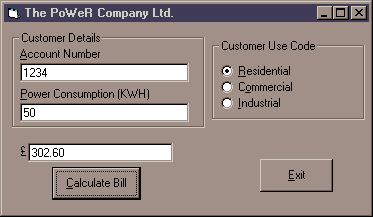
Today you will be creating a VB application to calculate bills for a city power company. The application should run in a single form, and should resemble the following:
Using this form, the user must enter:
The customer’s account number (try to ensure that only numbers are accepted in this text box)
The amount of power consumed, in KWH (again, only numbers should be accepted)
A customer use code – residential, commercial, or industrial
The Calculate Bill button should do the following:
Check that the user has entered all the necessary data
Calculate and display the overall bill based on the following scheme:
|
Customer Use Code |
Charge |
|
Residential |
6.52p per kwh used |
|
Commercial |
£60 for the first 1000 kwh and 4.5p for each additional kwh |
|
Industrial |
£76 for the first 1000 kwh and 6.5p for each additional kwh |
Notes:
You will find the Val function useful for converting the text strings contained in the Account Number and Power Consumption text boxes into numbers, prior to calculating the bill.
To determine the use code of a customer, your application will have to examine the Value properties of the 3 option buttons.